Posted on Leave a comment

Minolta MD 50mm f1.7 / f2.0- Lens Repair Guide

Minolta MD 50mm f1.7 Lens Repair

A step by step guide to repairing the underated  Minolta 50mm f1.7   This Minolta MD Lens Repair Guide can also be used for many other short focal length MD series lenses such as the 50mm f2 (which is identical in construction) and the 28mm, 35mm and 45mm MD types.  Most short focal length Rokkors share a very similar construction and while there may be minor differences the essentials will be almost identical.  

This is NOT true of long focal length and zoom MD lenses which will be very different in design and construction.  

The guide covers the late model MDIII series but the earlier MD series with 49mm filter threads will be identical. The earliest MD type with 55mm filter threads is somewhat different.

Copyright 2021 High5Cameras,
Free to use, copy and distribute so long as no charge is made for use,
distribution or access and authorship and web address is freely acknowledged.

NOTES BEFORE YOU START

The Minolta MD 50mm f1.7 is a relatively easy lens to work on but does have some small challenges – please bear in mind that this is a Minolta MD Lens Repair Guide, you may well face challenges inside the lens that you will need to work out.  These can include stripped screws, deformed parts etc.
Read through the entire guide before you start to make sure you understand the basics and are aware of hat you may need in the way of tools and are prepared for any possible problems that may arise.

When working on one side of the lens (eg the front) always be mindful about what’s happening at the other side (eg the back).  I always keep caps on as much as possible to prevent any accidents.  The classic mistake is for people to press on the lens while it is on a workbench and break things on the downside of the lens like the aperture lever.

There is no such thing as luck in repairing optical equipment, if you do it right, using skill and patience you will be rewarded with a perfectly operating lens. A rushed or bodged job will result in the lens being devalued, unpleasant to use and possibly unusable so…..take your time, get the right tools and materials, don’t take shortcuts or advice from people who know less than you (check out my camera history here).

There are no prizes for fastest or almost working in the world of lens repair so read the Minolta MD Lens Repair Guide from end to end before starting to familiarise yourself with the process.

Minolta MD 50mm f1.7 Lens Repair

Start by putting a rear lens cap on while you work on the front part of the lens.

The quality of any repair is down to your skills, your tools, patience and most of all mindfulness.

Good servicing is taking your time, there are no prizes for the fastest lens strip down and rebuild.

Phase 1 Minolta MD Lens Repair Guide
Minolta MD Beauty Ring

Remove the lens beauty ring.  This will require a rubber cup as there are no spanner slots on the beauty rings of most MD series lenses.

With the beauty ring removed all of the essential screws and fittings for the front part of the lens are exposed.

Filter Ring

Start by removing the filter ring retaining screws using a JIS screwdriver. 

There are three of these around the filter ring. One of these is indicated in the picture.

Filter ring fittings differ between various versions of the lens.  Some have three tabs, some have a fourth tab which sits over and around one of the optical element retainer screws.

Remove the three screws retaining the filter ring.  Keep these separate as they are sometimes a different size to the optical element screws which will be removed next.

Remove the three screws retaining the front optical group.  One of these is indicated in the picture.

Remove the three screws and keep these separate from other parts.

Exercise caution as these screws are tight, a slip with a screwdriver here can impact the lens.

Front Optical Unit

The front optical unit can now simply be pulled free.  Its very common for vaporised grease to have gotten behind this and it may cause the unit to stick.  It can be gently pried up using a fine screwdriver or cocktail stick gently under its edge.

Store the front optical unit safely.

With the front optical unit removed the aperture diaphragm blades are exposed.  In an MD series these are very thin and very fragile.  It’s best to open the diaphragm to maximum to reduce any risks to the diaphragm blades as you move forward.

Phase 2 Minolta MD Lens Repair Guide

You now need to remove the focus barrel.  This is retained by three screws around its front edge.  These hold in place a brass ring which in turn holds the focus barrel by a ridge around its circumference.

Set the lens at infinity BEFORE removing these screws.

Minolta MD Brass Ring

Here’s the brass ring and screws removed.  Once these are removed the focus barrel simply slips off of the lens.
The brass ring is sometimes made of thin steel.  Keep this safe as it is easily damaged. Before removing the screws set the lens to infinity focus. It’s assumed the lens worked ok at infinity focus prior to strip down, if not the process at the end of this guide will set infinity for the lens.

Minolta MD Measure Gaps

Measure the gaps between the slots of the two helicoils and make notes as to the gap sizes.  In this picture the outer helicoil is to the left and the inner helicoil to the right.  I normally use some jewellers screwdrivers to gauge the distance. Its not super critical but it will help with reassembly to know the measurements.

Phase 3 Minolta MD Lens Repair Guide

Turn the lens over and remove the three screws surrounding the rear optical unit with a JIS driver. Exercise caution, these can be tight and you don’t want a screwdriver skating across the rear lens surface.

These screws are usually quite long.

Minolta MD Small Black Plate

With the three screws removed the small black plate can simply be removed. Note it has a flat side near the aperture control lever.

SPECIAL NOTE: Some very early versions of the MDIII lens do not have this plate.  They have shorter screws that fasten directly to the rear optical unit.

Minolta MD Rear Optical Unit

With the rear plate removed the rear optical unit will simply be free.  I normally use some angled tweezers to grab it by its fitting lugs and extract it.

Store the unit safely.

Phase 4 Minolta MD Lens Repair Guide

Remove the 4 screws around lens mount and store separately.

Minolta MD Lens Mount

Once the screws are removed you can simply pull the lens mount free.  It’s a good idea to hold onto the aperture ring and keep it pressed down while you do this to avoid any risk that the aperture ring comes off at this point which can result in the loss of the small ball bearing.

Observe the rear of the lens mount assembly.  Note the cut out which engages with the diaphragm actuating lever.

Also note the brass liner which runs around the base.  Be very careful as the brass liner is not attached, it will normally be held on by grease but can come free very easily.  Its is extremely thin and very easily damaged so clean this very carefully with a cotton bud dipped in IPA.

With the lens mount removed you can now see the lens focus lock tabs. Note that one has open sided holes for its fitting while the other has closed holes

Be careful from here on with the strip down.  The aperture mechanism in an MD is mostly plastic and the aperture lever is very fragile.

While holding the aperture ring to the lens very carefully set it to about a mid position.  This will make it easier to remove in the next step.

Cup the rear of the lens in your hand, preferably inside a Tupperware box or clear bag and gently pull the aperture ring free. Inside the ring there is a tiny spring and ball bearing and these can easily fly out and be lost.

Sometimes the bearing will stay with the lens, sometimes it will fall into your hand.  Sometimes it will simply vanish – take this step easy.  If you don’t see the ball bearing examine your hands carefully.  It’s so small it may be stuck to your hand.

The pic shows how small the bearing and its pusher spring are. The bearing is 1.2mm in most MD lenses.

This is why I generally remove the aperture ring  inside a large clean bucket or Tupperware box.  It minimises the risk of a loss.

The spring will most normally stay stuck inside the aperture ring but to be sure it is not lost I normally extract it using a cocktail stick to ease it free and store the spring with the bearing inside a secure container.

When I clean/refurbish a lens EVERYTHING gets cleaned, to avoid loss of small parts everything is removed.  This is the aperture locking tab being removed.

With the aperture ring removed this will simply push out. It’s ‘keyed’ so will only fit one way on reassembly.

Phase 5 Minolta MD Lens Repair Guide

Before removing the focus helicoil locking tabs note how they are fitted.

They do not press too hard against the side of the helicoil.  If these are replaced to tightly they will cause the lens focus to be stiff.

Remove the helicoil locking tabs with a JIS driver making a note of how they are arranged.

The open sided one is away from the aperture lever.

If you are going to face a headache in an MD series lens this will be it.  The lock tab retaining screws can be tough to extract.

Chemicals are not an option here except sparingly as they can easily leak into the diaphragm. A Good set of JIS drivers is the only real option for safe extraction of these screws.

Heres one of the lock tabs being extracted.

With both lock tabs extracted the inner and outer helicoils can simply be unscrewed from each other.

The picture shows L-R the inner helicoil, outer helicoil, lens body.

This completes the strip down of the lens.

MECHANICAL CLEANING

All components APART FROM the inner helicoil are now cleaned with hot soapy water and/or IPA. All threads are chased out with a fine bamboo skewer or pin.  The outer helicoils threads are very fine and the smallest bit of dirt or dried grease will give the lens a lumpy or gritty feel.  A lens shouldn’t be cleaned more often than necessary so you should take pains to get this right.

The inner helicoil is a challenge.  On the MD series the diaphragm forms part of the inner helicoil and the diaphragm can not be removed easily. In order to clean the helicoil I place the helicoil on its side on a clean cloth and then gently wipe the old grease off with cotton wool balls.  When most of the grease is removed I then use a cotton wool ball moistened with IPA to run around the threads.  Too much liquid on the wool ball can easily seep into the diaphragm and cause problems so go easy on liquids and be VERY CAREFUL of the aperture lever

The diaphragm of most MDs seldom suffer with oil contamination so its unusual to have to deal with stuck diaphragms in this series of lenses. If contamination is slight you can immerse the diaphragm in IPA and then air dry.  For serious contamination, which is rare, you will need to dissemble the diaphragm which is not covered in this guide.

OPTICS CLEANING

The Minolta MD series usually show haze caused by oil vapour on the lens group inner surfaces.  These are the optical surfaces that face inside the lens in each of the two optical groups.  These can be cleaned with a mild IPA solution and a lint free soft cloth.  You need to exercise extreme care here and do not apply pressure to the glass. Apply a mild IPA solution to the cloth just so the cloth is damp and then apply lightly.  Use a puffer brush to blow off any moisture and then use a clean cloth to clean out any evaporation marks by gently breathing on the lens surface.

In the MD series the front and rear optical groups are encapsulated and cannot be removed as individual components. If your lens has fungus or issues between elements in a group there is no repair possible

I normally clean the optics just prior to their reassembly into the lens and make sure the lens interior is blown clean with a puffer bulb.  You will always find some dust is present on reassembly – do not worry – they were no different when they came from the factory.

After cleaning the helicoils should be lightly greased using a suitable lubricant.  I prefer Helimax XP for most Minolta lenses.  This is applied thinly using a fine sable brush. On a Minolta MD series the lubrication needs to be slightly thicker on the inner helicoil thanks to its plastic surface. The outer helicoil needs to be very thinly lubricated or else the lens focus will be too stiff.

Notes on lubrication – The first time you so this you will need to work by trial and error to get the right feel.
Too much lubricant will result in the focus being stiff, too little and it will grind or be too light. You can test the ‘feel’ while the helicoils are assembled but it will be hard to assess without practice as to what the lens will feel like with its focus barrel mounted.

Phase 6 Minolta MD Lens Repair Guide

On reassembly the object is to get the helicoils spacing for focus the same as you measured at the end of Phase 2 and…

…with the lock tab locating holes in the right position for the lock tabs to engage with their slots.

You may need to unscrew the lens a few times and reassemble to get this correct.

You can see in the picture that the locating holes for the tabs are correctly orientated for the tabs to fit into the slots.

Replace the lock tabs.  This is the most fiddly thing with an MD series and supercritical on the 45mm f2 lens.

Here I am using a bamboo skewer to keep the tab in position while the first screw is put in.  The tabs can easily twist and turn while being replaced…

…and can impact the side of the lens. The tabs do not need to be in close contact with the edge of the lens or else they will cause the lens to jam. They also need to be flush with the top surface of the lens body when the lens is fully pulled back.

If the helicoil gaps are set correctly at the start of Phase 6 then it may be the tabs stand a little proud with the focus pulled back as far as possible.  This is not usually a problem but you must remember not to reassemble the rear of the lens with the tabs proud of the rear surface or the aperture mechanism can be jammed.

Phase 7 Minolta MD Lens Repair Guide

Replace the aperture lock tab if you removed it earlier.

Replace the aperture ball bearing spring if you removed it at the end of PHASE 4.  Seat the ball bearing on the top of the spring using a small blob of Helimax XP grease

While keeping a close eye on the bearing (and preferably doing this step inside a large Tupperware box or bucket)…

…trap the bearing in place by applying the aperture control ring at a slight angle to trap the bearing and then ease the rest of the aperture control ring down over the body of the lens.

NOTE: You will find it easiest if you trap the bearing under the aperture ring with the aperture control ring set at about a mid point.

Before attempting to refit with the bearing do a couple of dry runs so you know what to expect.

Immediately after fitting the aperture ring test the aperture ring f stops are nicely clicking.

Making sure the aperture control ring doesn’t slip off turn the aperture ring to its highest value the highest value (smallest aperture)

NOTE: Some versions of the 50mm MD series only go as high as f16 but the MDIII will go to f22.

Double check that the helicoil lock tabs are flush with the top edge of the lens body as described at the end of Phase 6

Phase 8 Minolta MD Lens Repair Guide

Place the lens mount over the lens and check that the diaphragm actuating lever is captured by the cut out in the mounting rings lever mechanism and place the lens mount onto the rear of the lens……

…. Now rotate the lens mount until the screw holes align with their fixing points.  If all is well the lens diaphragm will stop down as you turn to the lens mount around to match the F16 or f22 setting.

In the picture a skewer is being used to hold the mount in place at the correct position.

Secure the 4 screws that retain the lens mount to the lens body.  Do not overtighten these as the threads can strip quite easily.  They need to be firm but not gorilla tight.

Generally I leave these quite loose at this stage and only tighten down once I am happy the lens is working correctly. Check at this stage that the aperture is working correctly by activating the lever.  Check also that the lens focus is working by turning the outermost helicoil.  Do not wind the lens too far out or it can slip off the lock tabs at this point just turn it a quarter turn at most to ensure the focus is free and operating.

Phase 9 Minolta MD Lens Repair Guide

Replace the rear optical assembly making sure its screw hole are aligned with the fixing points beneath.  I use a cocktail stick to move the optical unit around and check that the holes are aligned to their fixing points.

Blow the lens clean before reinserting it.

Minolta MD 50mm f1.7 Lens Repair

Replace the rear plate making sure the flat side is located against the aperture lever and the blackened side is facing outwards (eg would face into the camera when mounted).

Minolta MD 50mm f1.7 Lens Repair

Replace the three screws that secure the plate and the rear optical group and then secure a rear cap to protect the rear of the lens.

Phase 10 Minolta MD Lens Repair Guide
Minolta MD 50mm f1.7 Lens Repair

Replace the front optical group. The lens should be blown clean prior to replacement.

Minolta MD 50mm f1.7 Lens Repair

Replace the 3 screws that secure the front optical group.

Phase 11 Minolta MD Lens Repair Guide
Minolta MD 50mm f1.7 Lens Repair

Attach the lens to a known good camera, look through the viewfinder and use the outer helicoil to bring the lens to infinity focus. 

I normally aim at a pair of radio towers around 8 miles away and use a camera with a split field focus.

Minolta MD 50mm f1.7 Lens Repair

If all is well with focus gently put the focus barrel over the lens and make sure the infinity mark is against the index line.  The barrel will also be set against the focus stop.

Minolta MD 50mm f1.7 Lens Repair

Carefully position the focus barrel locking ring to align with the three fixing positions.

A bamboo skewer is helpful for positioning this.

Minolta MD 50mm f1.7 Lens Repair

Fix the focus barrel locking ring with the three screws.  Do not overtighten as these will shear easily.

A good test of tightness is to hold the screwdriver between thumb and forefinger and roll the screwdriver between your fingers.  This will take it to just tight enough.

Recheck focus at the end of this and if needs be release the screws a little and shift the focus barrel around.  This can be fiddly to get perfect – take your time and don’t rush.

Minolta MD 50mm f1.7 Lens Repair

The filter rings come in differing styles for MD lenses.  This one has a position that fits over one of the lens fixing screws as shown.

Minolta MD 50mm f1.7 Lens Repair

Replace the filter ring and replace the screws holding it in place. You can see in this picture the short tab which simply goes over one of the front element retaining screws.

Minolta MD 50mm f1.7 Lens Repair

Cosmetically when the lens is at infinity the edges of the focus barrel and the filter ring shoulder should be almost flush.  So long as the helicoil measurements were correct on reassembly this will be as close as you can likely get.

Minolta MD 50mm f1.7 Lens Repair

Replace the beauty ring….

Minolta MD 50mm f1.7 Lens Repair

…and use a rubber cup to tighten down.  Take care with this as the filter ring is metal while the beauty ring is plastic.  Make sure it is correctly threaded before attempting to tighten down.

Minolta MD 50mm f1.7 Lens Repair

Take a final check and make sure the lens is operating correctly, focus at infinity is ok and all f stops and stop down are working correctly.

Notes on The Minolta MD 50mm f1.4 Lens

The f1.4 version of the MD lens is somewhat different. The basic process described for the f1.7 or f2 versions is the same but there are some differences in construction.

1/ The Filter Ring
The filter ring on the f1.4 version is part of the front lens body. With the beauty ring removed you will see two small grub screws. Remove these and then simply twist the enire front of the lens away which includes the filter ring.

2/ The Front Optical Element
The front element is retained by three JIS screws.

3/ The Rear Optical Element
Unlike the f1.7 and f2 versions the rear optical element is not retained by the  use of screws. It is screwed to the rera of the diaphragm assembly. You will find this easiest to remove with the lens mount and aperture ring removed. You may need to use some Isoprop to break down the thread lock.

4/ The f1.4 most usually only has a single helicoil lock tab.

The actual process for stripping down, rebuilding and setting infinity focus is otherwise identical in most respects.

Posted on 3 Comments

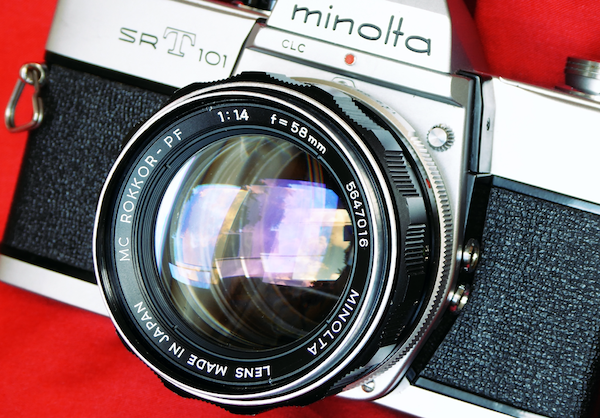
Minolta MC ROKKOR 58mm f1.4 – Lens Repair Guide

Lens Repair Minolta Rokkor 55mm f1.4

This Minolta MC Lens Repair guide can also be used for many other short focal length MC series lenses such as the 55mm f1.7. Most short focal length Rokkors share a very similar construction and while there may be minor differences the essentials will be almost identical. For our guide on Minolta MD 50mm f1.7 / f2.0- Lens Repair Guide click here

This is NOT true of long focal length and zoom Rokkor lenses which will be very different in design and construction.

This Minolta MC Lens Repair guide covers the MCII series but MCI series will be identical.

This guide will NOT be appropriate for MC-X Series, MD Series or the earlier Auto Rokkor models which all employ very different construction.

Copyright 2021 High5Cameras,
Free to use, copy and distribute so long as no charge is made for use,
distribution or access and authorship and web address is freely acknowledged.

NOTES BEFORE YOU START

The Minolta Rokkor 58mm f1.4 is a relatively easy lens to work on.  Please bear in mind that tis is a guide, you may well face challenges inside the lens that you will need to work out.  These can include stripped screws, deformed parts etc.
Read through the entire guide before you start to make sure you understand the basics and are aware of hat you may need in the way of tools and are prepared for any possible problems that may arise.

When working on one side of the lens (eg the front) always be mindful about what’s happening at the other side (eg the back).  I always keep caps on as much as possible to prevent any accidents.  The classic mistake is for people to press on the lens while it is on a workbench and break things on the downside of the lens like the aperture lever.

There is no such thing as luck in repairing optical equipment, if you do it right, using skill and patience you will be rewarded with a perfectly operating lens. A rushed or bodged job will result in the lens being devalued, unpleasant to use and possibly unusable so…..take your time, get the right tools and materials, don’t take shortcuts or advise from people who know less than you.

There are no prizes for fastest or almost working in the world of lens repair so read the Minolta MC Lens Repair guide from end to end before starting to familiarise yourself with the process.

Lens Repair Minolta Rokkor 55mm f1.4

Start by putting a rear lens cap on while you work on the front part of the lens.

The quality of any repair is down to your skills, your tools, patience and most of all mindfulness.

Good servicing is taking your time, there are no prizes for the fastest lens strip down and rebuild.

Phase 1 Minolta MC Lens Repair
Lens Repair Minolta Rokkor 55mm f1.4

Remove the lens beauty ring.  This can be done with a lens spanner but a rubber cup is a better solution.  A lens spanner can easily mar the finish on the beauty ring.

Lens Repair Minolta Rokkor 55mm f1.4

With the beauty ring removed all of the essential screws and fittings for the front part of the lens are exposed.

Phase 2 Minolta MC Lens Repair
Lens Repair Minolta Rokkor 55mm f1.4

Start by removing the front optical element group.  You will see there are two sets of lens spanner cut outs.  You need only the outer pair.

Apply the lens spanner and gently but firmly turn the lens while keeping downward pressure on the spanner. 

Lens Repair Minolta Rokkor 55mm f1.4

The front optical group after being unscrewed can be simply lifted out of the lens body.

Store this somewhere safely.  I usually store lens groups in a Tupperware box lined with lint free cloth pending cleaning and reassembly.

You are advised not to disassemble this group but cleaning will be discussed later.

Lens Repair Minolta Rokkor 55mm f1.4

With the front optical group removed the aperture mechanism is now exposed…….

Lens Repair Minolta Rokkor 55mm f1.4

It’s safest at this point to open the aperture to its widest.  This will minimise risk of damage to the very fragile aperture blades as you move forward in the disassembly.

Phase 3 Minolta MC Lens Repair
Lens Repair Minolta Rokkor 55mm f1.4

Using a JIS screwdriver remove the three screws that retain the filter ring…..

Lens Repair Minolta Rokkor 55mm f1.4

…and simply lift the filter ring away. Make sure the screws are stored safely and not mixed up with other screws.  I normally allocate small dishes for the various screws and fastenings to avoid confusion later.

Phase 4 Minolta MC Lens Repair
Lens Repair Minolta Rokkor 55mm f1.4

You now need to remove the diaphragm assembly.  This is retained by 4 screws around its edge. 

One of them is highlighted in the picture….

Lens Repair Minolta Rokkor 55mm f1.4

Using a JIS screwdriver remove the four screws around the aperture mechanism….. 

Lens Repair Minolta Rokkor 55mm f1.4

….and remove the diaphragm assembly carefully. The rear optical group is still attached to this so extract this with great care so that the rear optics are not damaged.

Lens Repair Minolta Rokkor 55mm f1.4

Here is the diaphragm assembly rear view after removal.  You can see that the rear optical group is still attached.  It is far easier usually to remove this group with the diaphragm removed.

Take great care of the diaphragm assembly, it is fragile and easily damaged by rough handling. 

Take note of the fact that the assembly has a flat edge on one side.  You will see why later.

Phase 5 Minolta MC Lens Repair
Lens Repair Minolta Rokkor 55mm f1.4

With care unscrew the rear optical group.  Be careful here as the diaphragm assembly has a number of small parts at the rear and the pins and springs can be easily damaged. Remember to stay mindful, keep focused, and THINK before you act.

Store the optical groups somewhere safe while you move forward with disassembly.

Here are the two optical  groups from this lens being stored in a small Tupperware box line with lint free cloth.

Phase 6 Minolta MC Lens Repair
Lens Repair Minolta Rokkor 55mm f1.4

Check the diaphragm assembly for correct function and see whether there is oil contamination. If the oil contamination is light I usually spray the diaphragm out with a Freon free cleaning solvent and then let it bath in Isoprop Alcohol for around an hour before leaving it to dry thoroughly at room temperature.

Lens Repair Minolta Rokkor 55mm f1.4

If the unit is heavily contaminated it will require stripping down completely. 

Diaphragm strip down and rebuild is not usually required and this guide will not cover this aspect.

Phase 7 Minolta MC Lens Repair
Lens Repair Minolta Rokkor 55mm f1.4

Now it’s time strip the focus mechanism for cleaning and lubrication. 

Set the lens focus to infinity.

It’s assumed that the lens focused correctly prior to stripping down but if not don’t worry it will be corrected later.

Lens Repair Minolta Rokkor 55mm f1.4

Start by removing the three screws around the edge of the focus barrel with a JIS screwdriver.  These are on top of the brass coloured ring. Take care to extract each screw after removal and be careful – each of these screws has a tiny washer – DO NOT LOSE THEM.

Once removed, store them safely.

Lens Repair Minolta Rokkor 55mm f1.4

With all three screws removed the focus barrel will simply slip off from the lens body….this reveals the two focusing helicoils.

These go by different names but to keep life simple the guide will refer to the brass colored one as the outer helicoil and the silver colored (inside the brass one) one as the inner helicoil.

Lens Repair Minolta Rokkor 55mm f1.4

Measure the distances between the inner helicoil to the brass helicoil – normally on an MC lens the inner helicoil will be almost flush with the brass outer helicoil.

Measure also the gap between the brass helicoil and the lens base.  Normally I use a collection of fine screwdrivers to assess distance.  In this case a 1mm driver is being used and it is an exact fit. Make a note of these measurements.

Phase 8 Minolta MC Lens Repair
Lens Repair Minolta Rokkor 55mm f1.4

Now remove the lens mount assembly from the rear of the lens body. Start by removing just a single screw.  If the screw is short then replace it.  If it is long remove it.

DO NOT REMOVE THE SHORT SCREWS

Here is a picture to give you an idea of scale of the short and long screws. 

These alternate around the lens mount plate.  You only need to remove the 4 long screws for servicing of the lens. Removing the short screws will release parts of the lens that are difficult to reassemble and generally there is no need to remove these parts.

Lens Repair Minolta Rokkor 55mm f1.4

With the four screws removed, as before store them safely and then simply pull the lens mount assembly from the body of the lens.

Take care also at this point NOT to remove the aperture ring.  I usually tape the aperture ring to the body prior to this step to make sure it does not come away with the lens mount due to stuck grease.

Phase 9 Minolta MC Lens Repair
Lens Repair Minolta Rokkor 55mm f1.4

Cup the rear of the lens in your hand, preferably inside a Tupperware box or clear bag and gently pull the aperture ring free. Inside the ring there is a tiny spring and ball bearing and these can easily fly out and be lost.

Lens Repair Minolta Rokkor 55mm f1.4

Sometimes the bearing will stay with the lens, sometimes it will fall into your hand.  Sometimes it will simply vanish – take this step easy.  If you don’t see the ball bearing examine your hands carefully.  Its so small it may be stuck to your hand.

This is why I generally do this inside a large clean bucket or Tupperware box.  It minimises the risk of a loss.

The previous picture and this one give an idea of size – the bearing is most normally around 1.2mm.  

In the previous picture the bearing is sitting on top of a small spring.  This bearing and spring provide the click stops.

Store the bearing somewhere safe.

Place some low tack tape over the hole with the small spring to prevent loss or remove the spring entirely.

A small needle, needle nosed tweezers or a cocktail stick can be used to extract it.  Store this safely with the bearing. The spring is very tiny barely larger than the index numbers on the lens, take care when handling it as it is prone to flying off and getting lost.

Phase 10 Minolta MC Lens Repair

Remove the three screws from the helicoil key/lock tab.

Be careful here as these are sometimes lacquered in place.  If they don’t turn out easily apply some heat or isoprop alcohol.

It’s very easy to strip the heads on these so take care.

Remove the helicoil key/lock tab.

Unscrew the helicoils from the lens body.
Its good practice to count the turns before the parts separate and mark the separation point on the two parts.
Its not necessary for the 58mm f1.4 MC but it is good practice – not all lenses are kind to technicians.

L-R in picture – lens body, outer helicoil, inner helicoil.

Note: The inner helicoil has screw holes in its top part – this faces the front of the lens when assembled.

This completes the strip down of the lens.

We now have to consider cleaning the components and reassembly.

MECHANICAL AND BARREL PARTS – NOT INCLUDING DIAPHRAGM MECHANISM

For cleaning you will need a soft toothbrush, cotton wool balls and Isopropyl Alcohol (IPA)  and a lot of patience.  I generally clean down with hot soapy water first and then soak the helicoils in IPA for a few hours before wiping down with cotton wool. The threads on the helicoils are extremely fine and the smallest piece of grit or dried grease will cause problems later on.  Usually these are chased out with a fine needle before cleaning again.

My own view on cleaning is to get the parts absolutely spotless prior to reassembly to give the lens the longest life before any further servicing is needed.

Normally when I rebuild a lens I will strip and clean EVERYTHING.  The lens mount assembly can be flushed with IPA, all of the barrel components such as the aperture control ring, filter ring and focus barrel will be thoroughly cleaned.  Index marks with their numbers can be scrubbed with a soft toothbrush to remove dirt and grime.

OPTICS CLEANING

The Minolta MC series can show haze caused by oil vapour on the lens group inner surfaces.  These are the optical surfaces that face inside the lens in each of the two optical groups.  These can be cleaned with a mild IPA solution and a micro fibre or lint free soft cloth.  You need to exercise extreme care here and do not apply pressure to the glass. Apply a dilute IPA solution to the cloth just so the cloth is damp and then apply lightly.  Use a puffer brush to blow off any moisture and then use a clean cloth to polish out any evaporation marks.

CAUTION

You are advised NOT to remove the lenses from within each group.  Minolta used a very soft coating formula in almost all of the MC series lenses and this can be damaged by even very mild cleaning and careful handling.


I normally clean the optics just prior to their reassembly into the lens and make sure the lens interior is blown clean with a puffer bulb.  You will always find some dust is present on reassembly – do not worry – they were no different when they came from the factory.


Lens Repair Minolta Rokkor 55mm f1.4

After cleaning the helicoils should be lightly greased using a suitable lubricant.  I prefer Helimax XP for most Minolta lenses.  This is applied thinly using a fine sable brush. On a Minolta MC series the lens is semi self lubricating thanks to the material used in construction of brass to aluminium so the lubricant needs to be quite thin and very evenly spread.

Notes on lubrication – The first time you so this you will need to work by trial and error to get the right feel.


Too much lubricant will result in the focus being stiff, too little and it will grind or be too light. You can test the ‘feel’ while the helicoils are assembled but it will be hard to assess without practice as to what the lens will feel like with its focus barrel mounted.

Phase 11 Minolta MC Lens Repair

On reassembly the object is to get the helicoils spacing for focus the same as you measured at the end of PHASE 7 and with the lock tab recess aligned to the threaded holes for the lock tab. You don’t have to be super precise but its best to get it as close as possible.  You may need to unscrew the helicoils a few times and try at different entry points to the threads to achieve this.

Replace the focus lock tab.  Take care not to overtighten the screws.

After replacing check that the helicoils will rotate correctly.  The lock tab, if not centred can cause the focus to jam or be stiff. I normally apply a very thin smear of Helimax XP to the sides of the recess.

Phase 12 Minolta MC Lens Repair

Do a trial run of fitting the aperture ring to the rear of the lens.  Some MCs will be fussy about what position the ring needs to go back on (eg will only easily fit at the f5.6 position) Do a dry run if needs be BEFORE replacing the small ball bearing.

The trick to get the bearing back into position is to replace the spring and then apply a small dab of lubricant/grease to the top of the spring.  Apply the bearing to the grease to hold it in place.

I normally position the bearing by using a cocktail stick with a small dab of grease on its end to retain the bearing….

…keep the lens body in position while you keep an eye on the bearing and the apply the aperture ring at a slight angle to trap the bearing in place and then ease the aperture ring down over the rest of the lens body.

This is why you do a dry run earlier at the start of Phase 12 to make sure the ring will fit easily as some MC lenses will be awkward to fit the aperture ring at some positions.

Lens Repair Minolta Rokkor 55mm f1.4

While making sure the aperture ring does not slip off apply the lens mount to the rear of the lens body making sure the aperture actuation  lever is at the base of the lens and on the opposite side of the lens to the aperture index mark.

You can see in the picture the aperture index mark is on the opposite side to the aperture actuation lever.

Lens Repair Minolta Rokkor 55mm f1.4

Replace the four long screws into the lens mount ring.  Do not overtighten these for now.


This is in case anything is wrong and requires a quick strip later. Just tight enough is good enough for now.

Phase 13 Minolta MC Lens Repair
Lens Repair Minolta Rokkor 55mm f1.4

In order to replace the diaphragm mechanism you need to be aware of some elements of assembly.

Th diaphragm barrel has a flat side as shown in the picture.  This has to locate against the lens body where the focus lock tab sits…..

Lens Repair Minolta Rokkor 55mm f1.4

….here is the focus lock tab and the flat part of the diaphragm barrel needs to be aligned with this PLUS…..

The diaphragm actuating lever shown needs to locate into the aperture control ring slot on the lens body……

Lens Repair Minolta Rokkor 55mm f1.4

….The aperture control locating slot is shown here.  This is where the Diaphragm body lever needs to mate to.

It seems tricky but in fact its quite easy.  Here’s how to do it…

Lens Repair Minolta Rokkor 55mm f1.4

First set the aperture control ring to f2…..and by using the diaphragm barrel lever at its rear open the diaphragm to its widest aperture.

Place the diaphragm barrel into the lens making sure the flat side is aligned with the focus lock tab.

Look through the rear of the lens body – this is why you leave the rear lens element out during reassembly until this step…..

Lens Repair Minolta Rokkor 55mm f1.4

..and maneuverer the diaphragm and the aperture ring until the diaphragm lever is located into the aperture control ring slot.

This seems hard at first but you will see it is actually quite easy in practice. 

Once diaphragm is installed hold it gently in place and rotate it slightly so that the screw holes align.

Lens Repair Minolta Rokkor 55mm f1.4

Cap the rear of the lens to protect the aperture lever and replace the screws that retain the diaphragm barrel to the lens body.  Do not overtighten as these can shear off under too much torque.

Once secured check that the diaphragm is behaving normally by selecting f16 and operating the aperture actuating lever.  The aperture should stop down and reopen quite normally. Check also operation at f1.4

Phase 14 Minolta MC Lens Repair
Lens Repair Minolta Rokkor 55mm f1.4

Replace the rear optical group…..

I would normally clean the group before reinsertion and blow the inner surface clean.

Lens Repair Minolta Rokkor 55mm f1.4

….and secure the group with a lens spanner.

Lens Repair Minolta Rokkor 55mm f1.4

Replace the front optical group…..

These would be cleaned at this point and the inner surface blown clean with a Rocket Blower.

Prior to securing the front lens it’s a good idea to run a quick torch test before the lens is fully secured down.  This may catch any pieces of dust or lint prior to final assembly.

Lens Repair Minolta Rokkor 55mm f1.4
…and secure with a lens spanner.
Phase 15 Minolta MC Lens Repair

Attach the lens to a known good camera look through the viewfinder and use the brass inner helicoil to bring the lens to infinity focus. 

I normally aim at a pair of radio towers around 8 miles away and use a camera with a split field focus.

Lens Repair Minolta Rokkor 55mm f1.4

Once you are happy that the lens is focusing correctly set the lens at infinity and then very carefully replace the focus barrel making sure the barrel indicates infinity against its index mark. Replace the focus barrel retainer screws with their washers and lightly tighten.  Recheck focus and once happy tighten down – do not over-tighten as these screws will shear easily.

Lens Repair Minolta Rokkor 55mm f1.4

Replace the filter ring.

Replace the beauty ring. Take care to ensure this is correctly threaded before tightening down with a rubber cup or lens spanner.

Lens Repair Minolta Rokkor 55mm f1.4

Check lens for all functions and do a final tighten on the mount ring if you left this loosely dogged down at the end of Phase 12

Fully check lens focuses correctly and that all f stops are working correctly.

Posted on 14 Comments

Last Place Hero – The Chinon CE-5

Camino

Mostly plastic, mainly good was how the Chinon CE-5 camera was described by a review at the time.  Here’s my take on it 40 years after it launched.

More forgotten then even the Nikon F-301(which I happen to love)  the Chinon CE-5 is definitely a last place hero though in fact in its day one of the very first cameras to ever be able to manage Auto Focus a feat which eluded many of the bigger makers.  In part the AF may have doomed it.  A savvy buyer, back in the balmy days of 1981, when the CE-5 launched may well have reasoned that  if the big boys like Pentax, Canon, Minolta and Nikon have all fallen flat on their faces trying to make Auto Focus work why trust a no-name to get it right.

The three small contacts that appear on the upper left side of the lens mount were there to facilitate operation with an AF lens sold as an extra.  Chinon only ever made two AF lenses for this.  A standard 50mm and a 35mm-70mm Zoom.  Both are now so rare I spent three years seeking one without any luck at all.  The lenses are big, bulky and dwarf the camera.

Chinon CE-5
The CE-5 Sans Grip

The Chinon CE-5 was only in production for about 12 months and had the disadvantage in the UK market, along with every other Chinon, by being exclusively sold by Dixons. A high street chain with  a reputation for goods of dubious quality and often shockingly cheap and shabby. As a result I doubt Chinon ever really got any serious photographers attention and were generally seen as cheap wannabees.  That’s a real shame as their build quality is often superb and functionally the cameras work extremely well the CE-5 is no exception.

So lets have a look at the Chinon CE5 –

  • It featured a Seiko Electronic Vertical Metal Bladed shutter – quite some improvement over most budget cameras with their cloth horizontal shutters.  The CE-5 uses a stepless shutter for its Aperture Priority (AP) mode with speeds from ‘B’ to 2000th – few cameras from this period would run over 1000th.
  • Exposure compensation for the AP mode up to 2 stops – it’s a little odd they way they implemented it but it’s there plus an exposure lock function which Chinon called Exposure Memory.
  • A power winder/motor drive option that allowed the camera to be fired off the power winder grip even with no batteries in the winder.  Adding the power winder made the camera very comfy to hold and with no batteries added little weight. 
  • One of the best Depth of Field Preview (DoF) controls I have ever used.  Only the Canon FTb has a better and more conveniently placed one in my experience.
  • Slick controls, well placed, no annoying on/off switch (the bane of my life with Minolta X-x00 series.  The on/off switch is located on the shutter speed dial.  If it’s off it’s off, if you have selected a shutter speed its on.
  • Smooth winder action that would give Minolta a run for their money and a better viewfinder than anything except the Minolta with their AcuMatte screens.  The CE-5 has a nice bright view with a  full information viewfinder showing Aperture, Selected Speed and the meters  recommended speed.  In Aperture priority mode the display shows the cameras selected speed. The view finder features a splits prism and a micro collar for focusing but the screen is fixed and non-interchangeable. Again few cameras have interchangeable screens and this is usually limited to pro quality gear.
  • Hot shoe, very standard by the 1980s but with the nice touch of a flash ready indicator in the viewfinder.
  • And to round it out an electronic self timer – none of this clockwork stuff seen on vintage gear but fully  electronic and selectable for 5 or 10 seconds – a nice touch which really shows the CE-5 was modern from the age of electronics.

So an excellent run of features all topped off with a nice soft plastic external leatherette with a very soft feel, good ergonomics and something special for the creative photographer – a simple double exposure switch.  Just slide the switch over after taking a photos and wind on.  The lever will disengage the wind on mechanism but arm the shutter.  After taking the second shot the lever automatically returns to its normal mode though you can flip it again if you want a go at doing a triple exposure.


Chinon really put some effort in for the CE-5 and launched it with a whole load of extras including an odd looking flash which works very well.

On top of all of the good things already mentioned the CE-5 used the Pentax K mount so there are literally thousands of lenses that it can accept.  Users should beware though that some 3rd party lenses can cause the lens release tab to jam.  I had a Sigma that regularly caused issues.

Shinin Auto S-280 Flash
The Unusual Chinon Flash

Best thing of all with the Chinon CE-5 is they were mostly bought by mums and dads and seldom used. Many are probably still sitting in cupboards little used in near perfect condition and often available at bargain prices as a result.

With all this goodness flowing from the CE-5 it surely has some downsides – right? Well there’s no Mirror Lock Up (MLU) which is unlikely to ever be a problem for most people and if it is something you must have well that’s tough luck as most cameras after the early 80s deleted this as a feature even in their top of the range pro equipment .

Chinon CE-5 Top
Chinon CE-5 Simple Clear Controls

It’s not perfect, it’s mostly made of plastic, the body core is actually metal but it would be hard to know that from the exterior as almost all the external elements are plastic.  Even the winder lever is plastic! Canon spoofed it with their plastic casings and used a copper base paint layer so the camera  would  ‘brass’ over time and appear to be made of metal, they also used a metal baseplate.  Minolta used a similar trick with a brass undercoat but put a plastic ‘protector’ plate over the base to disguise the fact that it’s plastic.  Chinon just shot from the hip and made it out of plastic and had done with it. That’s a real shame as the plastic fantastic vibe does make the camera feel cheap. The CE5 does feel a little more fragile in the hands especially with regards to its winder lever but that’s just a feeling rather than fact.

The biggest downside with Chinon is they are nigh impossible to repair.  They were never a huge seller in the day in the UK so spares and expertise are hard to come by and in the CE-5s case its so heavily electronic any faults are likely to mean it’s a total loss.  To be fair that’s no different with many electronic cameras from this period.  Even Minoltas XD (regarded by many as the best MF camera ever made) can suffer catastrophic failure due to its ageing electronics.

Obviously being electronic the CE-5 needs batteries, but these are standard and readily available SR44 type which is nice as it means no messing about with battery conversions but it has no manual backup so without batteries your dead.

As a shooter the CE-5 I owned was a great grab and go camera.  It was reliable and its meter accurate, it fitted easily in the hand and when kitted out with a motor drive was a good grippy camera.  The simple and well laid out controls with a full information viewfinder make it an easy camera to live with.

Chinin CE-5 With Power Winder
Fully Dressed with Motor Drive CE-5

A massive range of glass is readily available for it thanks to its Pentax K mount which lets you get on with almost any glass – you can even get a readily available K Mount to M42 adaptor to use older M42 lenses which are plentiful and cheap.  I used some Chinon M42 mounted lenses with mine via a mount adaptor and found Chinon glass to be extremely good in the 50mm range. The lenses perform extremely well and are very well made using brass and aluminium construction when most manufacturers had moved to plastic. Equipped with a readily available and ludicrously inexpensive Pentax M series 50mm it’s both compact and light.

Kitted out with a Pentax M-Series lens my own CE-5 shot very well and with its range of features could outperform many cameras from the bigger brands. If only Chinon had made it with metal and not had the awful Dixons brand attached to it, I suspect this would have been a very serious competitor to the Canon AE-1 and the Minolta X-700 so beloved of the new generation of film fans.

Sadly, a last place hero thanks to its off brand name and its more glamorous rivals shining more brightly but, it’s definitely a star performer when it comes to value and functionality.

Chinon CE-5 With Motor Drive Full Frontal
Sharp and Compact the CE-5 with Pentax Lens and Motor Drive
Posted on 5 Comments

A life in a lens

Life in a lens

A stroll through my cameras

Spring

Life in a lens

I started serious photography back in the halcyon days of 1972.  Back then, serious cameras cost serious money – my first pro SLR was the Olympus OM-1.  To give younger readers an idea of just how expensive this stuff was, my OM-1 cost almost as much as my first car! Most people back then didn’t have a color TV or a stereo, so cameras, especially SLRs, were naturally the preserve of the pros, the elite and those with a total passion for photography. Those who had neither the means nor inclination to own an SLR made do with an Instamatic – camera phones were 50 years away at the time. Add to this film processing costs and people were less inclined to take endless selfies and photographs of their dinner. Turns out the 70’s weren’t so bad after all.


Over the years I got to shoot film with most of the major brands and it’s interesting to me now, looking back, at how they came across back in the 1970s compared to today’s beardies and wunderkinds views on the web  – the new messiahs of the medium as they would have you believe. People new to film doing research as to what to buy may be interested as to how they were perceived by me (and plenty of others) back in the 1970s.

Pentax – the Granddaddy

The first commercially successful SLR whose basic layout set the standard for everyone else. Sadly by the 1970s they were looking old, tired and even the advertising featuring arch nice old duffer, tropical suit wearing, Mojita quaffing and pool side chat host Sir Alan Wicker only exasperated things. It typecast the camera as a thing a terribly nice old thing would buy. Few pros used Pentax and advertising implied it was designed for people who like a nice hot cup of cocoa before bed.

Nikon – Undisputed masters of the professional world.

Look at any press pack screaming for a comment on the news and they were all shooting Nikon. Out of reach price wise for any but pro press packers or hobbyists who were happy to live in a carboard box as the price of their passion. Undeniably the best, old and clunky definitely but undeniably desirable just for the name and its association with it being THE pros choice.

Canon – Hardly ever seen, and usually only the point and shoots.

The AE-1 was some way off and the FT series were looking VERY dated, like a Spotmatic but with a lead weight thrown in for free – if you needed to club a baby seal while out and about the FTb was perfect.

The AE-1 when it arrived was promoted by the sorts of sports people you might trust to kick a ball about but often had trouble stringing sentences together.  Buying a camera on the basis of a swimming champs recommendation seemed insane and confirmed its amateur status. The adverts made me cringe then and probably would now with the ‘I can’t believe I can use a camera’ coming from people who sounded like they would struggle with a toaster.

Minolta – Seen as amateur kit if they were seen at all. 

Few shops carried them apart from happy snappy type things or at best the rangefinders.  The SRT was on life support and it looked it.  The girl in her best outfit but with the wonky eye and pint of cider at the party that everyone is trying to avoid.  No motor drive capability doomed them as a pro camera. Of course, the 7000 series auto focus completely took everyone by surprise and was hugely successful, but to me with my smug mode turned fully on it just screamed amateur hour.  I can still remember a relative buying one and as they were a very skilled photographer I experienced the sort of shock you may feel if a relative told you they were going off to fight for a Marxist guerrilla group in South America!

Olympus – Brash new challenger. 

The bad boy of the pack, being bought by those who wanted to cock a snook at convention (me for instance), the outside fringe and those who wanted to be different (me again!). Of course, David Bailey was plugging them and who didn’t want to be David Bailey back then. I can remember walking out the shop with my first OM1 and thinking ‘well I am up there with the big boys now so out of the way peasant and go take some pictures of your cat with your Kodak 33′.

Over the next few years the league table of the manufacturers swayed this way and that but the basic view of these manufacturers wavered not one bit.

The Big Five Minus One - My Cameras
Typical camera fare from the mid 70s – These would have been amongst your choices

Summer

I sleep walked into being a pro photographer, alternating between being pro or doing a day job.  At times I would exhaust myself from pro work and lose the ‘edge’ so I would drop back to doing a 9-5.
The pro work was variable, mostly product photography, press work for local papers (Mayor and Z list celeb opens new Supermarket or Sophie wins best sponge cake at village fete), the occasional assignment for a small run magazine (Gas Mask Collector – Eric finds a rare Soviet gas mask at a flea market).  My gear increased of course and I moved up/down/sideways depending on brand loyalty from Olympus to Nikon. 

I got to use a few more cameras; the dreadful Olympus OM-4Ti, the horrid Canon T90, the ghastly Canon EoS which confirmed to me the soulless nature of all of Canons creations.

The shoot that finally banged the mausoleum door shut was a catalogue shoot. The company made so many changes it started to seem like I was in one of those repetitive nightmares.  The endless changes from the client turned what should have been a simple shoot into a quagmire of bland.

That was it – I was done with photography!

The Maldives
Late 89 taking a break from lens work. The break would turn out to last 10 years!

Autumn

I returned to photography at the turn of the millennium for a limited turn handling very specialised products but by 2010 I was done. For good this time I was sure! The pressures of the shoots became highly stressful and the demands from the people paying for the shoots increased. The rise of the web meant constant changes to shoots, constant demands for shoots of revised products and timescales to get work done shrunk to everyone wanting everything the day before yesterday!

The digital kit was sold off along with the studio gear and that was that. Peace at last!

Roll on 5 years….. I found myself in a junk shop and amongst the decaying bric-a-brac I spotted a Pentax KX.  It reminded me of my old Spotmatic. I picked it up to see if it was a runner and on a whim I decided to buy it for the princely sum of £12. Just holding it made me want to take pictures again so I stopped at a chemists and bought myself some film and started shooting.

The feel of a film SLR in my hands triggered all the old reflexes and made me want to be creative  – like a black and white print slowly emerging in developer I knew I was home.


I started to acquire more cameras as part of a small collection of iconic cameras from my 1970s salad days. It became obvious that a great many of them were sold by people who were completely clueless, or completely dishonest.
The endless online wails of people struggling with broken cameras made me realise I was not alone. Little by little I found myself drawn into the world of camera repair and refurbishment. In part this was because getting a professional technician involved was expensive.  I don’t begrudge paying for expertise but the economics of collecting forced me to consider doing work myself.  How hard could it be? Very hard if the last few years are any guide!

In Japan
In Japan with a restored Konica rangefinder. The Konica helped me break the ice in camera stores.

Starting with online guides and more enthusiasm than skill I busted quite a few things, but learnt useful lessons.  There’s an old saying, ‘those who make no mistakes make nothing’ However don’t take that principle too far. Of course, I have improved and now the odd challenge only serves to keep confidence balanced safely short of arrogance.

Minolta SRT 303b - My Cameras
A labour of love – a beautiful refurbished Minolta SRT303b after many hours work – now ready for a new home.

I started with lens repairs. Over time I built up a good selection of tools and practical experience of fixing lenses as well as cameras. I work mostly on Minoltas but have recently started to work with Pentax models. The longer term is taking a course allowing me to carry out more comprehensive works on wider selections of cameras.

Winter

Film is back – who would have thought it!

The current renaissance allows oldies like me to relive their youth and younger users get in on the zeitgeist. Sadly, from experience, I estimate as many as half the film cameras being sold are defective in some way.  Film is expensive and it’s frustrating to see people having endless problems when buying classic gear. Wasting film, processing costs and their time and often becoming disenchanted with the whole thing.

For many, the problem is self-inflicted  – expecting a mint camera for £30 from eBay to work out of the box. Most buyers have little appreciation of the fact that these cameras are operating way beyond their expected service life. Many are by now in dire need of servicing and attention.
How many 50-year-old complex machines that still work flawlessly do you own?

After a particularly frustrating experience with a camera from a dealer, I decided to start providing quality cameras. Cameras I had personally used and worked on to provide a better film experience for people. Allowing them to expand their photographic skills with film.

So, that’s my aim  – I want to be able to provide people with a known FULLY working camera. So that they can truly enjoy the film experience. As well as enjoying these beautiful cameras as much as I did the first time around. Now of course I am appreciating them all over again.

Minolta X Series - My Cameras
3 less than perfect cameras from eBay now beautifully restored
Minolta 58mm 1.4
Beautifully restored MC58mm
Woman at Work
Another batch of cameras and lenses ready to be bought back to life

It’s heartening seeing classics I learnt to shoot with are part of the wave of the future for many.  It’s good to see younger people getting back to film. I want to help them have the best possible experience they can have.

Check out the online store with a selection of cameras chosen by me and used by me. This shows you are buying from someone who not only knows cameras. As well as used them for a large part of their life but is truly passionate about them.

Earlier, I used the phrase ‘Current Renaissance’ and to me that’s how I feel about the resurgence of film.  But, if we are to have a lasting film community and not simply a fad it’s critical to keep this equipment running, the knowledge to use and repair it alive and to encourage younger people to get involved in film.

I spent a large part of my life using cameras. Now it seems fitting that I spend time repairing them for others to use.

Life for me has truly been a life through a lens – from both sides of it.